Getting Started with Yale Smart Opener
Here you can find the answers on Getting Started with the Yale Smart Opener

FAQ
Yale Home is the application to use on your Smartphone. The app is available on the Apple App Store or Google Play.
Download the Yale Home App from the links below.


Once you have downloaded the Yale Home app you will need to click on 'Create an account' or 'Sign in' if you already have an account.
Yes, you can add more than one opener to your home. You can have 220 Yale Smart devices linked to the Yale Home application.
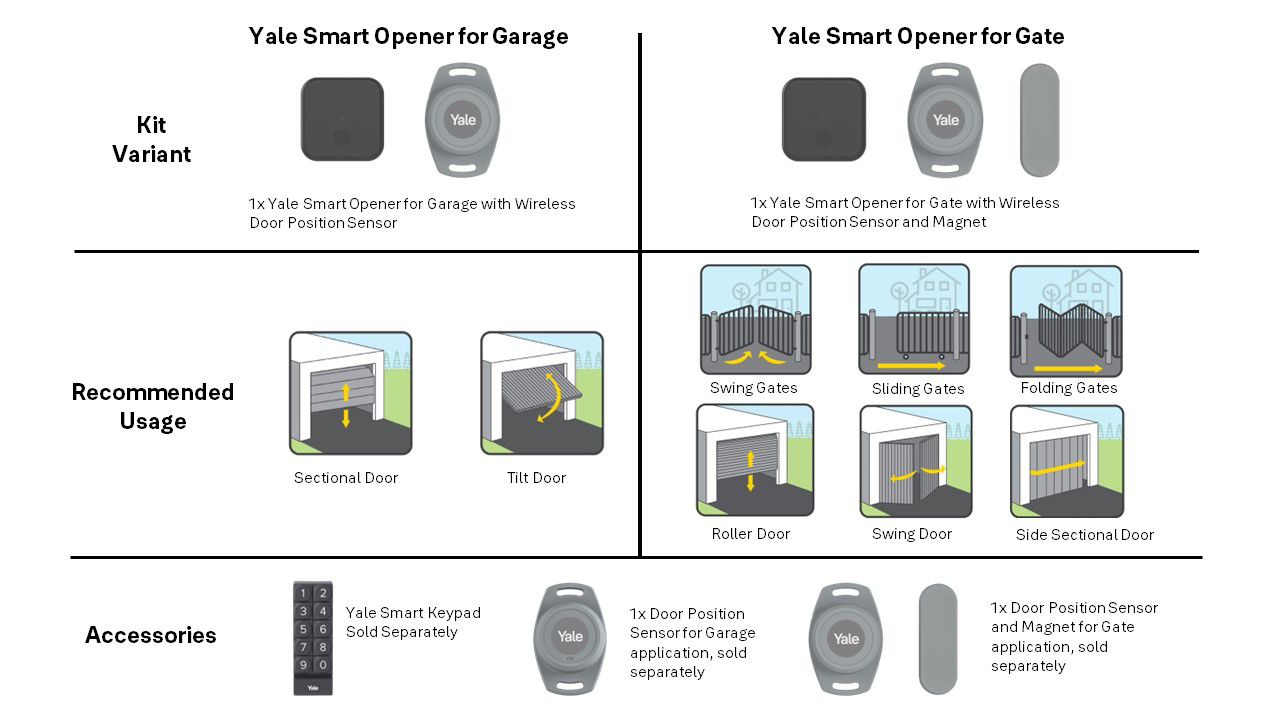
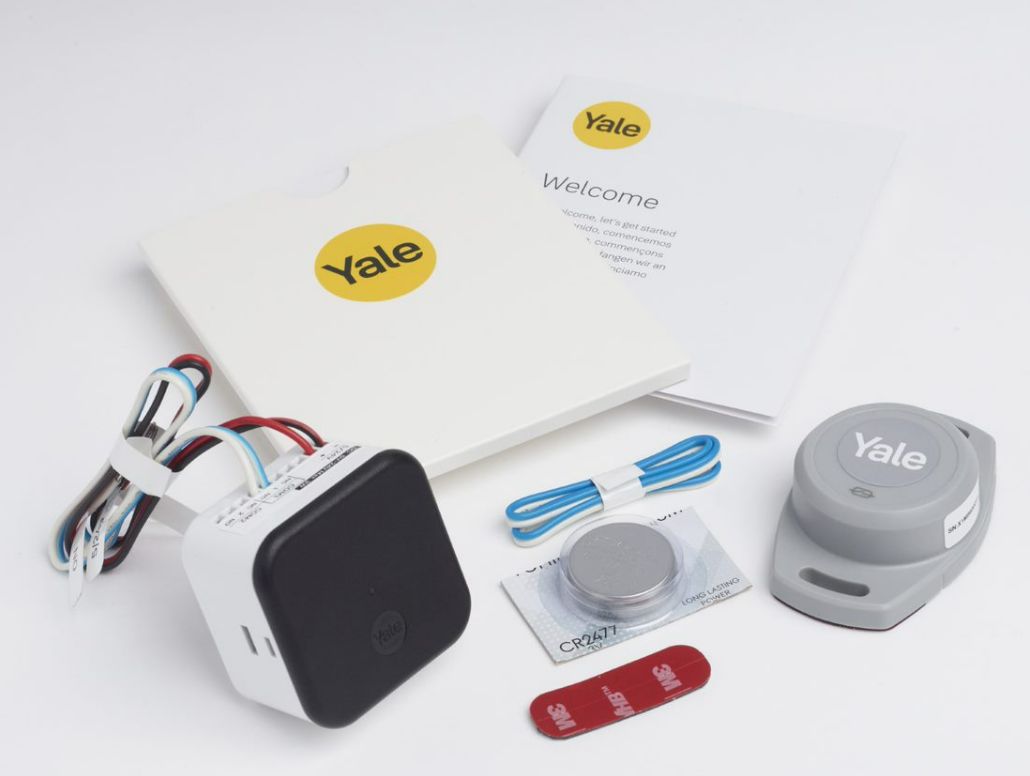
GARAGE DOOR Opener kit
1 x Yale Smart Opener
1 x Yale Door Position Sensor with CR2477 Battery
2 x Wiring looms
2 x Double sided tape
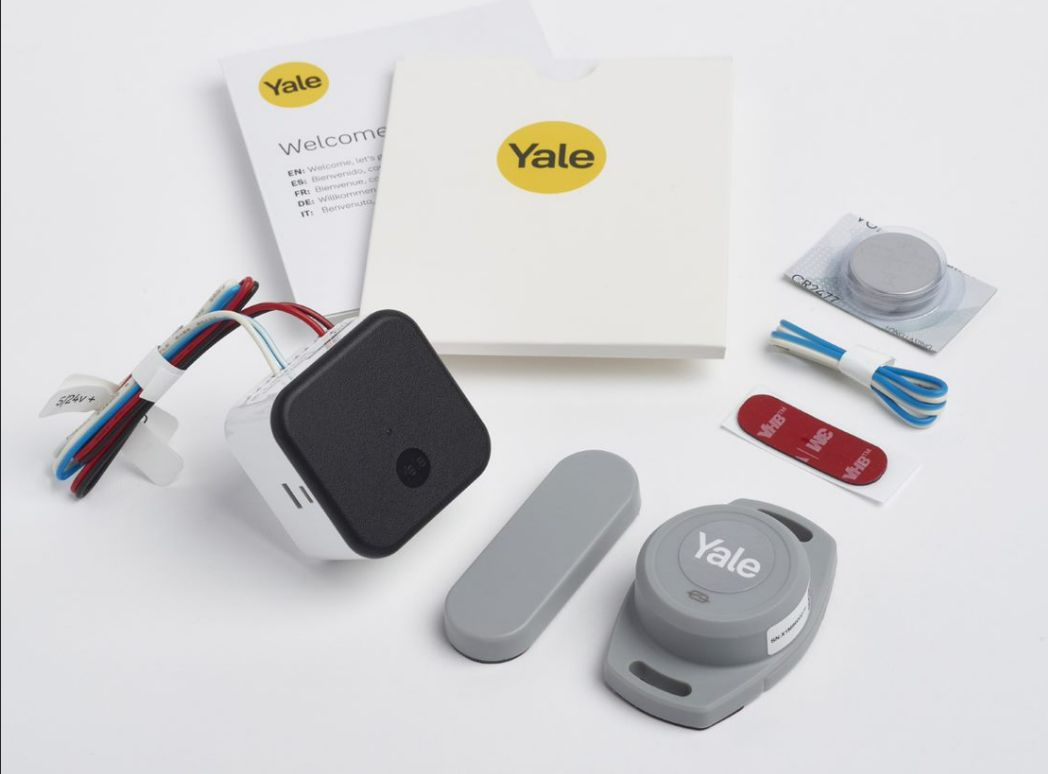
GATE Opener kit
1 x Yale Smart Opener
1 x Yale Door Position Sensor with CR2477 Battery
1 x Magnet for Door Position Sensor
2 x Wiring looms
2 x Double sided tape
Yale Door Position Sensor - Garage Door Accessory
For Garage application, sold separately
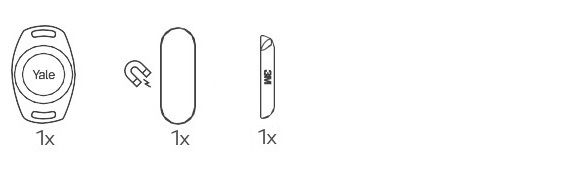
1 x Door Position Sensor with CR2477 Battery
Yale Door Position Sensor with Magnet - Gate Accessory
For Gate application, sold separately
1 x Door Position Sensor with CR2477 Battery
1 x Magnet
1 x Double sided adhesive
Yale Smart Keypad - Sold Seperately
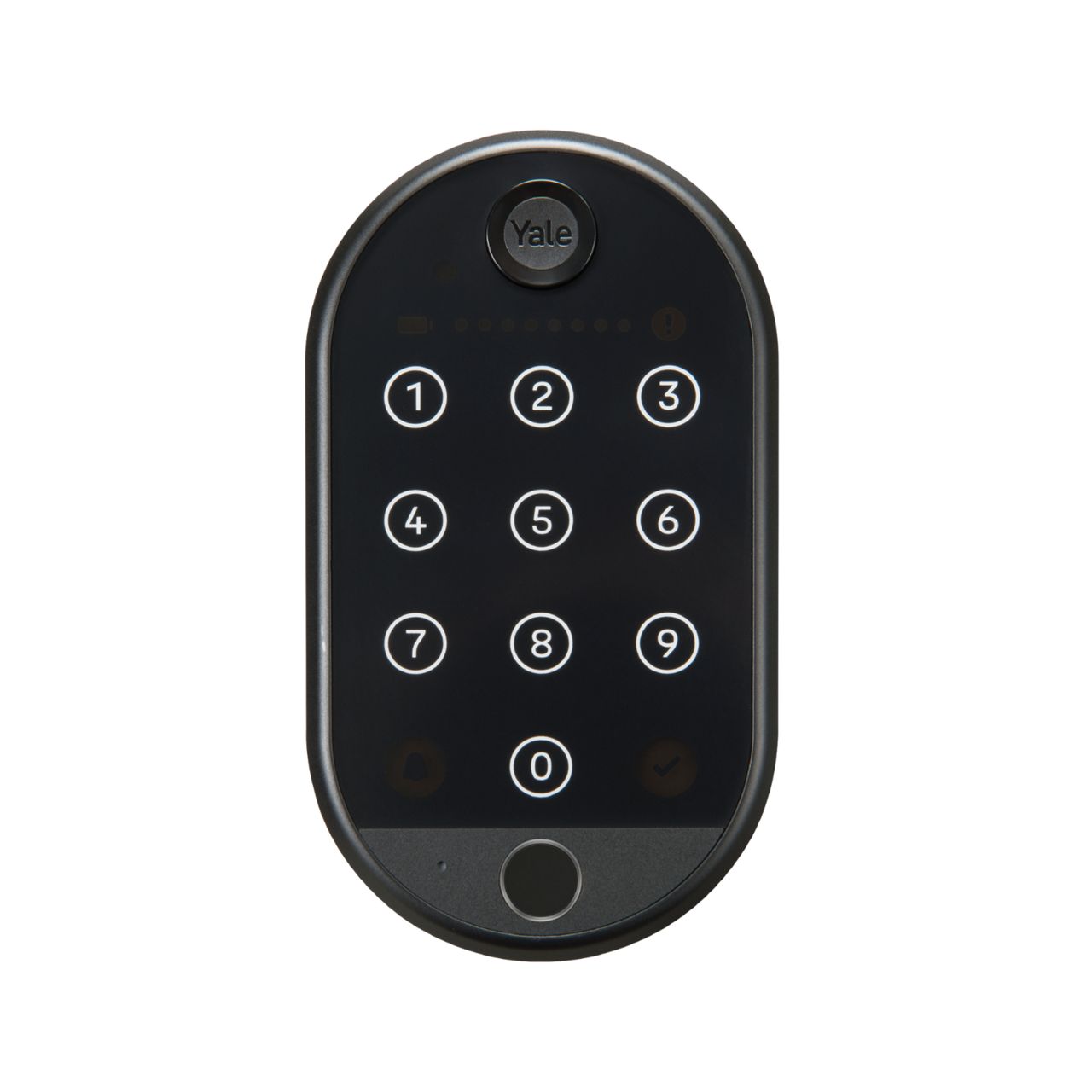
Yale Smart Keypad 2: Fingerprint - Sold Seperately
Here you will be able to check the compatibility of your Garage Door or Gate motor and view the wiring guide.
Click here to open the compatibility checker in a new window
If you are unable to find the model of your Garage Door or Gate motor, please reach out to our support team by clicking contact support.
Smart Garage Opener - Device Positioning
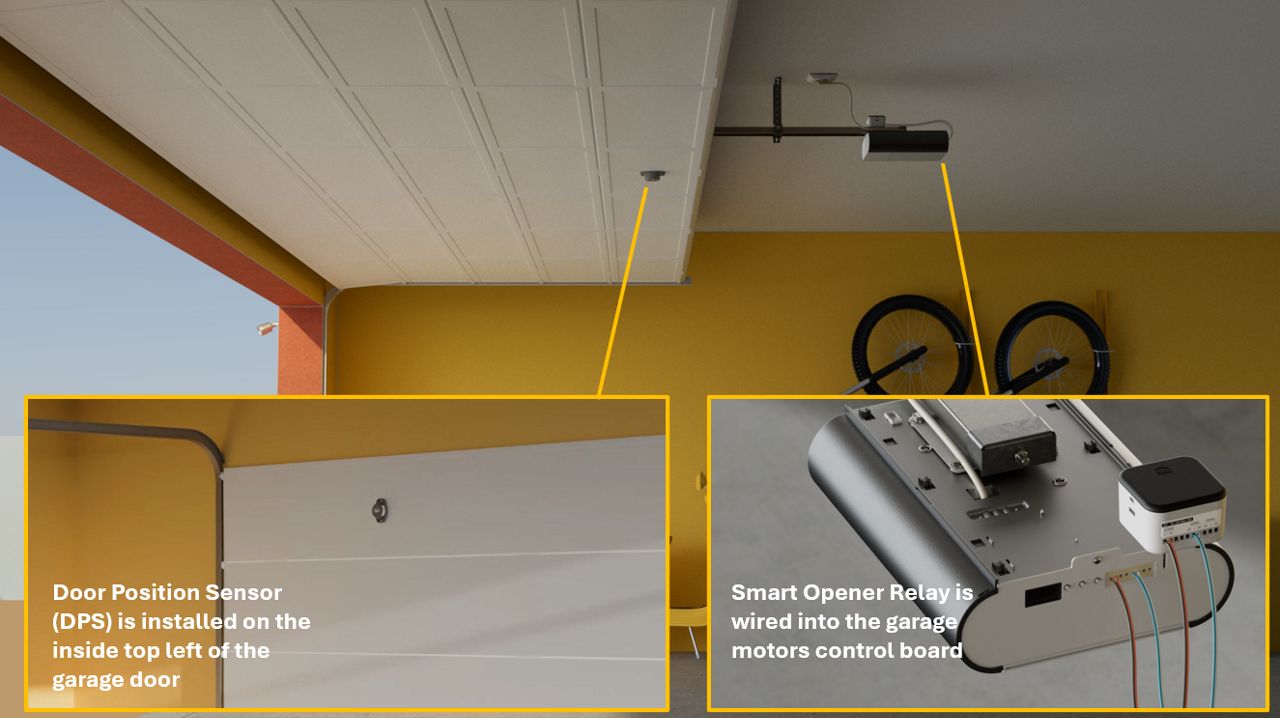
Door Position Sensor (DPS) and Magnet Positioning
- The Door Position Sensor (DPS) should always be installed on the inside top left of the garage door.
When a magnet is required for a garage door installation:
- Install it inside the garage.
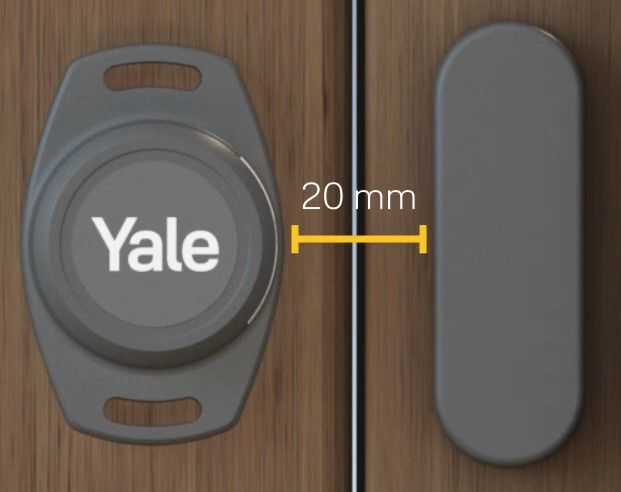
- Position the magnet to the right of the Yale logo on the Door Position Sensor.
- Ensure the magnet is placed within 20 mm of the Door Position Sensor.
Smart Gate Opener - Device Positioning
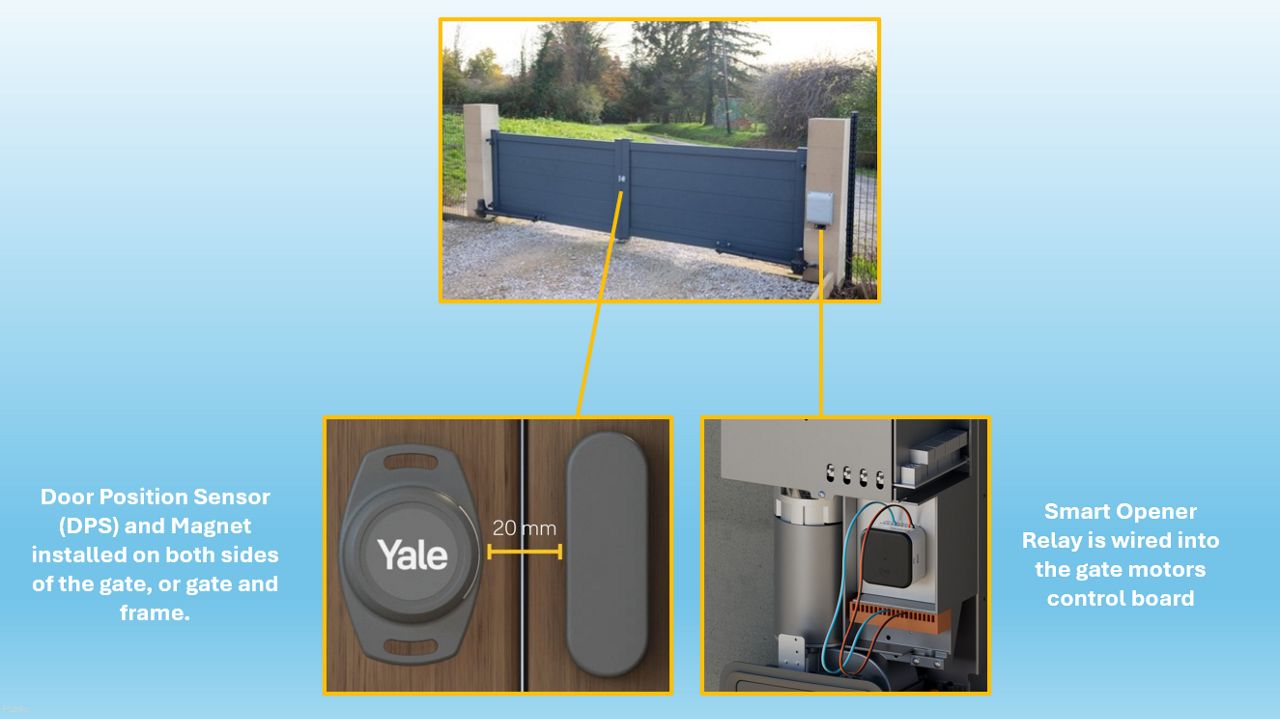
Door Position Sensor (DPS) and Magnet Positioning
- The DPS and magnet should be installed on both sides of the gate, or, one part on the gate and one on the frame (depending on the type of gate).
- Position the magnet to the right of the Yale logo on the Door Position Sensor.
- Ensure the magnet is placed within 20 mm of the Door Position Sensor.
Installation Videos
If the Yale Smart Opener needs to be installed outdoors for example on a gate, please be sure to place the components inside of a weatherproof box.
Yes, the Door Position Sensor is IP67 rated.
The operating temperature is between -20c and +60c.
The DPS measures 70mm x 46mm x 21 mm and weighs only 33.5g with the battery installed .
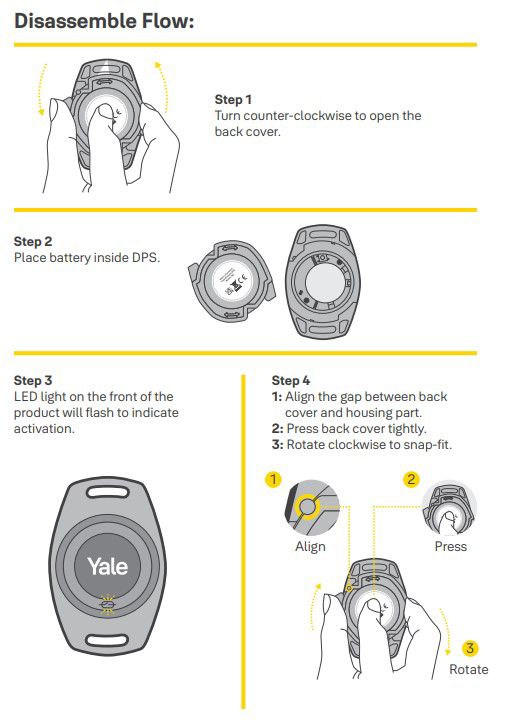
The Door Position Sensor (DPS) is set up in the Yale Home application. Select the top right hand + icon, scan the QR code then follow the steps to add the device.
To activate the DPS, remove the cover on the rear of the unit and insert the battery. The LED on the front of the unit will flash 10 times, close the cover and install the unit on your door or gate.
Click here to see our How To Videos
IMPORTANT - Ensure the magnet is always to the right of the Yale logo and within 20mm of the Door Position Sensor, installed on the inside of the Garage.
Position Example
Side Sectional Door
Roller Door
Tilt Door
Sectional Door
Swing Door
IMPORTANT - Ensure the magnet is always to the right of the Yale logo and within 20mm of the door position sensor.
Position Example
Folding Gates
Swing Gates
Sliding Gates
The expected battery life of the Door Position Sensor (DPS) is approximately 3 Years.
The battery is a CR2477 1000mAh Lithium coin battery. To replace the battery, remove the cover at ther rear of the sensor.
This guide provides steps to set up your Yale Smart Keypad. Before the installation begins, you may be prompted to update the firmware on your Yale Smart Opener.
- Before beginning the setup process, make sure the Keypad back light is blinking
- Open the Yale Home App, select the + icon at the top right of the screen
- Scan the QR code on the back of the keypad when prompted
- Select Start Setup and follow the onscreen instructions. You'll see a series of screens as the Yale Home app connects to your Smart Keypad and prepares it for use. As part of the process your Yale Keypad will download any new firmware updates, and will ask you to select which lock the keypad should work with
- Select Continue
Congratulations! Your Smart Keypad is ready to use.
The Yale Smart Opener is designed to receive power 5V-24V directly from a Garage Door Opener or Gate Automation device.
But on occasions, depending on the model of the Garage Door Opener or Gate Automation device, the Yale Smart Opener will require that you use a 110-240V AC to 1V-24V DC Power Supply converter adaptor in order to get power from an external power Plug.
Our recommendation is the Lighting EVER Brand 100 - 240 V (AC) to 12V (DC).
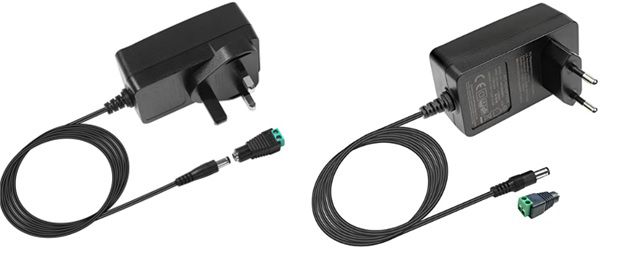
This can be found in most electronic or online retail shops. If these can’t be found in your regions, similar devices should be fine to use if they follow the recommended specifications below.
| Brand | Lighting EVER |
| Included components | 1 x Mains to 12V Power Supply |
| Input voltage | AC100-240V |
| Output Voltage | DC12V 2A |
| Wattage | 24 watts |
| Number of items | 1 |
| Output voltage | DC12V 2A |
The Black cable should be connected to the ' - ' connection point.
The Red cable should be connected to the ' + ' connection point.
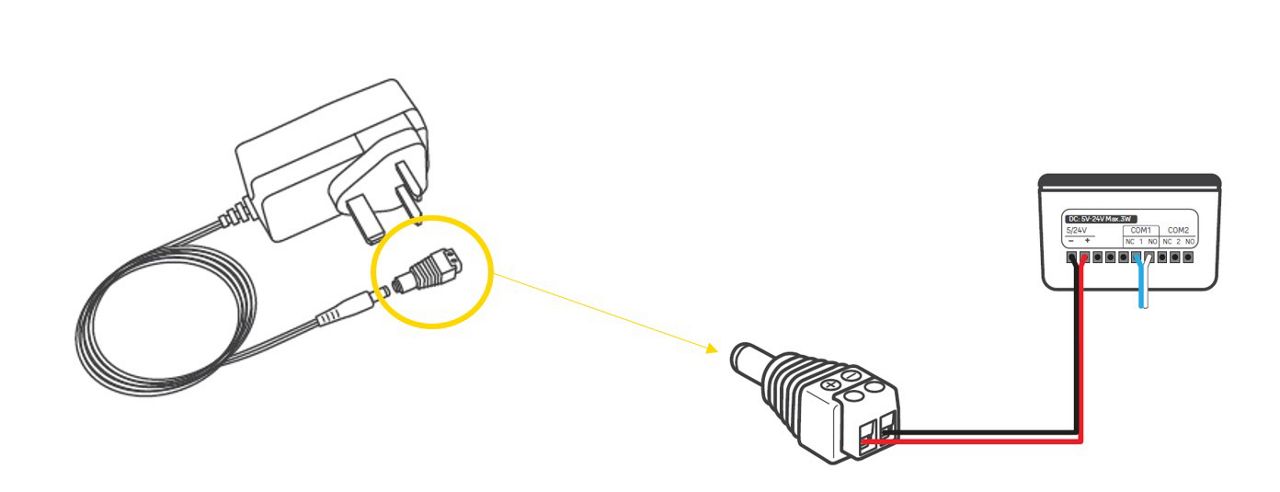
The Yale Smart Opener is designed to receive power directly from a Garage Door Opener or Gate Automation device.
But on occasions with certain Brands, the Yale Smart Opener will require that you use an adaptor to be able to use it.
We recommend the Normstahl Adapter box. This box can be used on the following brands and models below:
- Henderson Magic 600 & 1000
- Normstahl Magic 600 & 1000
- Entrematic Magic 600 & 1000
- Crawfords Magic 600 & 1000
- Yale Magic Magic 600 & 1000
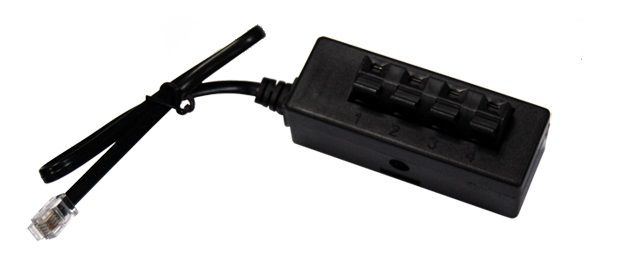
Always keep the gate or garage door in clear view when using the Yale Smart Opener. Make sure no one crosses or stands in its path while it’s moving.
The Yale Smart Opener upgrades most existing automated garage doors and entrance gates, allowing you to control them from anywhere using the Yale Home app. It’s designed to make access easier, more secure, and more convenient for every member of the household.
What Does a Garage or Gate Opener Do?
A traditional garage or gate opener uses a motor to open and close doors or gates, often controlled with a wall button or a short‑range remote control.
The Yale Smart Opener doesn’t replace your existing motor — it connects to it and adds smart functionality, so you can control your garage or gate from your phone instead of relying on physical remotes.
What the Yale Smart Opener Does
Once connected to your existing motor, the Yale Smart Opener allows you to:
- Open or close your garage or gate from your smartphone
- See whether it’s open or closed in real time
- Receive alerts if it’s opened unexpectedly
- Share access with trusted people
- Use smart automations for hands‑free entry
It brings your existing system into the Yale Home ecosystem for a seamless, single‑app experience.
Key Features and Benefits
- Smart automation
Set your garage or gate to open automatically as you approach. - Remote access from anywhere
Operate your garage or gate when you're away from home — ideal for family, visitors, or deliveries. - Better security awareness
Get instant alerts if your garage or gate opens unexpectedly. This is especially helpful since garages often store high‑value items like bikes, tools, and vehicles. - Easy access sharing
Give temporary or scheduled access to guests or service providers without handing out keys or remotes. - Door/gate status visibility
Check whether your garage or gate is open, closed, or jammed, and get reminders if it’s left open. - Supports multiple devices
You can add more than one Smart Opener to your home and manage them all in the Yale Home app (up to 220 Yale devices per account).
Connectivity Overview
Built‑In Wi‑Fi
The Yale Smart Opener connects directly to your home Wi‑Fi.
No Yale Connect Wi‑Fi Bridge is required.
Once connected, you can control the opener from anywhere using the Yale Home app.
Wi‑Fi Placement Tips
For the best performance:
- Install the Smart Opener within 20 metres of your router
- Ensure your phone shows a strong Wi‑Fi signal at the installation point
- Keep in mind that metal doors, walls, and appliances may reduce signal strength
Bluetooth Support
If Wi‑Fi is unavailable or temporarily offline, you can still operate the opener locally via Bluetooth (up to 10 metres).
Use of the Yale Connect Wi‑Fi Bridge
You can add a Yale Connect Wi‑Fi Bridge if you want to, but the Smart Opener doesn’t require it and is not marketed for use with one.
The Yale Smart Opener lets you control your garage door or gate motor from the Yale Home app.
It does this using a small internal component called a relay — a safe, simple switch designed to trigger your existing motor.
Here’s how it works in easy-to-understand terms.
What Is a Relay?
A relay is basically a remote‑controlled switch.
Instead of you pressing a physical button on a wall or remote:
- You tap the button in the Yale Home app
- The Smart Opener receives that signal
- Its relay “clicks” like a switch being pressed
- Your motor gets the trigger it needs to open or close
It’s the same action your current garage button or remote performs — just triggered wirelessly instead of by hand.
What Makes the Yale Smart Opener Different?
Traditional relays rely on a wired button.
The Yale Smart Opener adds smart connectivity:
- Wi‑Fi for controlling the opener from anywhere
- Bluetooth for controlling it when you’re nearby
This allows the relay to be activated directly from your smartphone, even if you’re not at home.
What Is a Dry Contact Relay (and Why It Matters)?
The Smart Opener uses a dry contact relay, meaning:
- It does not supply power to your garage or gate motor
- It only acts like a simple “open/close” button
- It’s compatible with nearly all garage and gate openers that use a push‑button trigger
Most motors are designed to receive a momentary signal (like a doorbell press).
A dry contact relay is the safest and most universal way to provide that.
In practice:
- Contacts close → the motor receives the signal → the door or gate moves
- Contacts open → the circuit stops → nothing else happens
Your motor still powers itself — the Smart Opener simply tells it when to act.
Putting It All Together
When you press “Open” in the Yale Home app:
- The command is sent to the Smart Opener via Wi‑Fi or Bluetooth
- The relay inside activates for a moment
- That momentary switch signal goes to your motor
- The motor opens or closes your garage door or gate
It’s the same behaviour as pressing the physical button — made smarter through wireless control.
Safety Warning
Working with electrical connections can be hazardous.
- Turn off power to the motor and follow the manufacturer’s instructions before wiring.
- If you are unsure about any part of the installation, consult a qualified electrician.
- Always follow local electrical regulations and use appropriate tools and safety gear.
Smart Opener Relay Connections Explained
- NC: Normally Closed (Break Contacts)
A normally closed contact allows current to flow through it in its normal state (when it is not activated).
- NO: Normally Open (Make Contacts)
A normally open contact does not allow current to flow through it in its normal state (when it is not activated).
- COM1 and COM 2
There are two input connections: COM 1 and COM 2. In most applications, only one input is required. However, some installations—particularly gate systems—need two separate pulse inputs: one to trigger opening and the other to trigger closing.
- Terminals Numbered 1 and 2
The numbered terminal (1 or 2) is Common contact of the relay. It acts as the main input or "feed in" that dictates which pathway electricity follows.
- + and - Terminals (Power)
Black(-) = Ground
Red(+) = 5-24V (Max 3W) DC Power Supply
The control board diagram is almost always found in the technical manual for your garage door or gate opener.
If you no longer have the manual, you can usually locate the diagram quickly by searching online for your opener’s brand and model number (e.g., “Chamberlain ML700 manual” or “FAAC 740 wiring diagram”).
Manufacturers typically publish these manuals on their websites, and they include wiring terminal layouts, button input locations, and connection points for accessories like the Yale Smart Opener.
Safety Reminder
If you are unsure where to connect the wires or are not confident working with electrical terminals, consult a qualified electrician or installer.
Always switch off power to the opener before touching any wiring.
First, we recommend using our online compatibility and wiring guide, which includes diagrams for many popular garage and gate opener models:
https://d15uagcao9b3et.cloudfront.net/wiring-guide-sahara
This tool can often help you identify the correct terminals or wiring method, even if your opener’s manual is unclear or unavailable.
If you’ve checked both your opener’s technical manual and the online wiring guide but are still unsure, the next step is to get help from a qualified electrician or installer.
Safety Reminder
If you’re not confident identifying terminals or wiring connections, consult a qualified electrician or professional installer.
Always turn off power to the opener before handling any wiring.
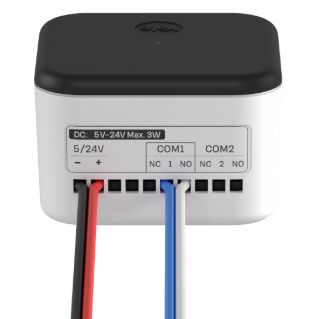
For most installations, you only need one relay connection — so you should use COM1.
Some gate controllers or specialist systems use two separate inputs:
- One pulse to open
- A different pulse to close
In those cases, you’ll use both COM1 and COM2 to match the opener’s required inputs.
If you’re unsure which your system needs, check your motor’s wiring diagram or consult a qualified installer.
You only need to use one of these terminals — never both at the same time.
The correct choice for your system will be stated in your garage or gate motor’s technical manual.
General guidance:
-
NO (Normally Open)
This is the most common option and is used by most garage and gate openers for a momentary trigger. -
NC (Normally Closed)
Used less often, and only on systems designed specifically for NC inputs.
Many control boards also mark this visually:
- An open circuit symbol usually means NO
- A closed circuit symbol usually means NC
If you’re unsure, check your motor’s wiring diagram or consult a qualified installer to avoid incorrect wiring.
Terminals 1 and 2 are the common (COM) terminals for the Smart Opener’s two relay outputs.
Each common terminal must be paired with either:
- NO (Normally Open)
- NC (Normally Closed)
…to create a complete relay circuit.
How they are used:
-
Terminal 1 → COM1
Used for most installations because most garage and gate openers only need one relay input. -
Terminal 2 → COM2
Only needed if your opener requires two separate relay triggers, such as:- One input for open
- A different input for close
These setups are more common with certain gate controllers.
In most cases:
You will only use terminal 1 (COM1).
If you’re unsure which your system requires, check your opener’s wiring diagram or consult a qualified installer.
The Yale Smart Opener relay can handle up to 1 A at 30 VDC during normal operation.
The absolute maximum rating is 2 A, but this depends on the type of load and the operating conditions, so it should not be exceeded during typical use.
Because most garage and gate motors only require a low‑voltage, momentary trigger, the relay is perfectly suited for this purpose.
If you are unsure about load requirements or wiring, consult a qualified electrician or installer.
The relay activation time is controlled by the Pulse Timing setting in the Yale Home app (found under Smart Opener Settings). This setting determines how long the relay keeps the circuit closed when triggering your garage door or gate.
Typical pulse times start at 500 ms (0.5 seconds), but you can adjust this value depending on what your specific motor requires.
If you're unsure which pulse length to use, check your opener’s technical manual or consult a qualified installer.

